Spark 核心之 Client 模式提交命令和特点分析
作者:互联网 时间: 2026-08-03 10:26:05
处理Spark 核心之 Client 模式提交命令和特点分析这类问题时,先确认目标场景,再按步骤核对配置或玩法细节。
一、开篇:你会写 spark-submit 吗?
先看一道面试题:
复制代码# 命令 Aspark-submit --master spark://master:7077 --deploy-mode client app.jar# 命令 Bspark-submit --master yarn --deploy-mode client app.jar如果你能准确回答——说明你对 Spark 部署模式的参数体系已经有了系统理解。如果你犹豫了——这篇文章将帮你彻底理清 Client 模式的所有提交命令和参数。
二、spark-submit 命令全景图
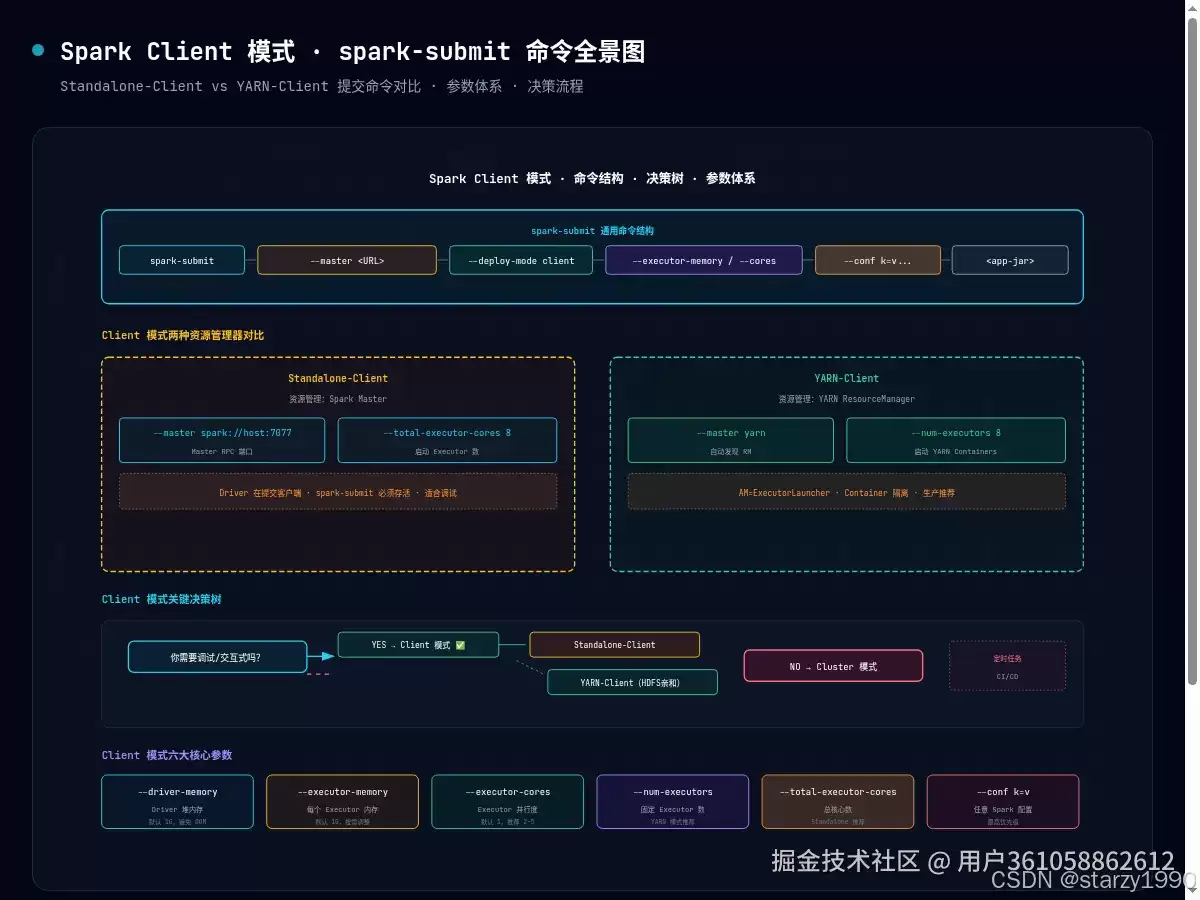
2.1 通用命令结构
复制代码spark-submit [通用选项] [应用选项] [配置选项] <app-jar | python-file | R-file> [app-args]每个选项组的作用:
| 选项组 | 前缀 | 核心参数 | 示例 |
|---|---|---|---|
| 通用选项 | --master--deploy-mode | 集群地址、部署模式 | --master yarn |
| 应用选项 | --class--name--jars | 主类、应用名、依赖 | --class com.example.Main |
| Driver 配置 | --driver-* | Driver 内存、核心数 | --driver-memory 2G |
| Executor 配置 | --executor-*--num-executors | Executor 资源 | --executor-memory 4G |
| 动态配置 | --conf k=v | 任意 Spark 配置 | --conf spark.sql.shuffle.partitions=200 |
2.2 --master 决定了资源管理器
复制代码# Standalone--master spark://master:7077# YARN--master yarn# YARN HA(多个 RM)--master yarn --conf spark.yarn.ha.enabled=true# 本地测试--master local[4]2.3 --deploy-mode client 决定 Driver 位置
Client 模式的核心语义:Driver 在提交客户端 JVM 中运行。
复制代码# 显式指定(推荐)--deploy-mode client# 省略时的默认值(取决于 --master)# --master spark://... → 默认 client# --master yarn → 默认 client# --master local[...] → 始终 client三、Standalone-Client 提交命令
3.1 完整模板
复制代码spark-submit --master spark://master-node:7077 --deploy-mode client --class com.example.SparkApp --name "my-standalone-client-app" --driver-memory 2G --driver-cores 2 --executor-memory 4G --executor-cores 2 --total-executor-cores 8 --conf spark.driver.port=4040 --conf spark.driver.host=192.168.1.100 --conf spark.default.parallelism=16 --conf spark.serializer=org.apache.spark.serializer.KryoSerializer /path/to/my-app.jar arg1 arg23.2 Standalone-Client 特有参数
| 参数 | 说明 | 默认值 |
|---|---|---|
--total-executor-cores | 总核心数(Standalone 特有) | 所有 Worker 可用核心 |
--executor-cores | 每个 Executor 核心数 | 1 |
--driver-cores | Driver 核心数(本地 JVM) | 1 |
注意:Standalone 没有 --num-executors——Executor 数量由 --total-executor-cores / --executor-cores 自动计算。
3.3 spark-shell(交互式 Client)
复制代码# spark-shell 默认就是 Standalone-Client 模式spark-shell --master spark://master:7077 --executor-memory 4G --total-executor-cores 8# 等价于 --deploy-mode client(默认值)四、YARN-Client 提交命令
4.1 完整模板
复制代码spark-submit --master yarn --deploy-mode client --class com.example.SparkApp --name "my-yarn-client-app" --driver-memory 2G --executor-memory 4G --executor-cores 2 --num-executors 8 --conf spark.yarn.am.memory=1G --conf spark.yarn.am.cores=1 --conf spark.yarn.queue=default --conf spark.yarn.maxAppAttempts=2 --conf spark.eventLog.enabled=true --conf spark.eventLog.dir=hdfs:///spark-logs /path/to/my-app.jar4.2 YARN-Client 特有参数
| 参数 | 说明 | 默认值 |
|---|---|---|
--num-executors | 固定 Executor 数量 | 2 |
spark.yarn.am.memory | AM(ExecutorLauncher) 内存 | 1G |
spark.yarn.am.cores | AM 核心数 | 1 |
spark.yarn.queue | YARN 队列 | default |
spark.yarn.maxAppAttempts | AM 最大重试次数 | 2 |
4.3 spark-shell on YARN
复制代码spark-shell --master yarn --deploy-mode client --executor-memory 4G --num-executors 8五、Standalone-Client vs YARN-Client 命令差异速记
复制代码# ======== Standalone-Client ========spark-submit --master spark://master:7077 --deploy-mode client --total-executor-cores 8 # ← 总核心数控制并行度 --executor-memory 4G app.jar# ======== YARN-Client ========spark-submit --master yarn --deploy-mode client --num-executors 8 # ← 固定 Executor 数量 --executor-memory 4G --conf spark.yarn.queue=default # ← YARN 专属 app.jar| 维度 | Standalone-Client | YARN-Client |
|---|---|---|
| 资源指定 | --total-executor-cores | --num-executors |
| Master 地址 | spark://host:7077 | yarn |
| 队列管理 | 无 | spark.yarn.queue |
| AM 配置 | 无 | spark.yarn.am.* |
| 日志聚合 | 无 | HDFS 事件日志 |
六、参数优先级机制
Spark 参数有三层来源,优先级从高到低:
复制代码优先级:--conf k=v > --<parameter> > spark-defaults.conf > 代码中的 set() (命令行最高) (专用选项) (配置文件) (代码最低)相同参数冲突时,后指定的覆盖前指定的:
复制代码# --executor-memory 最终为 8G(后指定的生效)spark-submit --executor-memory 4G --executor-memory 8G app.jar七、四种 Client 模式实战场景
场景 1:本地开发调试
复制代码spark-submit --master local[4] --driver-memory 2G my-app.jar场景 2:Standalone 集群交互分析
复制代码spark-shell --master spark://master:7077 --executor-memory 8G --total-executor-cores 16场景 3:YARN 集群生产级提交
复制代码spark-submit --master yarn --deploy-mode client --driver-memory 4G --executor-memory 8G --executor-cores 4 --num-executors 20 --conf spark.yarn.queue=production --conf spark.sql.shuffle.partitions=400 etl-job.jar 2025-01-01场景 4:Python PySpark on YARN
复制代码spark-submit --master yarn --deploy-mode client --executor-memory 4G --num-executors 8 --conf spark.pyspark.python=/usr/bin/python3 my-ml-pipeline.py --input hdfs:///data/raw八、总结
| 要点 | 一句话总结 |
|---|---|
| 命令结构 | spark-submit [通用] [应用] [配置] <jar> |
| --master | 决定资源管理器:spark:// vs yarn vs local |
| --deploy-mode | Client = Driver 在提交客户端 |
| 资源参数 | Standalone 用 --total-executor-cores,YARN 用 --num-executors |
| 优先级 | --conf > --param > spark-defaults.conf > 代码 |
作者:starzy | AI Data Engineer / 大数据技术实践者
博客:blog.starzy.cn | GitHub:starzy1990.github.io
专注 AI Agent · LangGraph · RAG · 大数据架构 · 数据工程实践
相关资讯
-
- 云顶之弈s9弗雷尔卓德城邦效果介绍
- 2026-09-16
-
- imovie如何添加音频文件
- 2026-09-16
-
- 纵横修仙界内测时间揭晓 纵横修仙界最新内测开启日期与参与方式
- 2026-09-16
-
- 元力音乐app如何导入音源
- 2026-09-16
-
- 三国天下归心双动召唤阵角色技能详解 三国天下归心双动召唤阵地队搭配与实战攻略
- 2026-09-16
-
- 王者荣耀世界虞姬 王者荣耀世界虞姬角色强度分析与实战技巧
- 2026-09-16